
GROMACS 伞形采样与WHAM
伞形采样与WHAM,包含终端操作、输入文件、实际数据和适用范围。
阅读本篇目录
本文以鸢算科技集群 GROMACS 2026.4 实际结果为例。下载输入、参考轨迹、分析与绘图资料包,资料包约 529 MB,包含参考轨迹。解压后进入 gromacs-examples。参考输出在 cases;新计算由 new-case.py 建立独立目录。
本篇任务与操作要点#
用两颗指定水氧的距离演示伞形采样,五个窗口中心为 0.3、0.4、0.5、0.6、0.7 nm,弹簧常数 1000 kJ mol⁻¹ nm⁻²。每个窗口 70 ps,WHAM 去掉前 20 ps。这个玩具坐标便于理解文件流,不是蛋白结合自由能算例。
先分别运行五个窗口,再把对应 TPR 和 pullf 文件按相同顺序列入两个清单。gmx wham 生成 PMF 和直方图;必须检查相邻窗口重叠以及分块时间稳定性,不能只看是否生成曲线。
图中是沿距离坐标的原始 WHAM 概率自由能。径向坐标含球壳几何因子,若要得到径向配对势需按定义考虑 2kBT ln r 修正;结合自由能还涉及约束释放、标准态等项。这里不把短采样的原始曲线解释成收敛的结合能。
1 准备与提交#
python new-case.py umbrella-0
cd work/umbrella-0
sbatch run.sh
run.sh 申请资源后执行 workflow.sh。不要在登录节点直接执行完整模拟。下列每个算例可单独新建副本并提交。
| 算例目录 | 本次内容 |
|---|---|
umbrella-0 |
完整输入、前置文件与真实计算输出 |
umbrella-1 |
完整输入、前置文件与真实计算输出 |
umbrella-2 |
完整输入、前置文件与真实计算输出 |
umbrella-3 |
完整输入、前置文件与真实计算输出 |
umbrella-4 |
完整输入、前置文件与真实计算输出 |
wham |
实际完成的分析输入与结果 |
最后的 wham/bar 依赖前面全部窗口,必须等所有窗口完成后再提交。清单中的相对路径读取 work 下的新结果;不能只创建分析目录就直接运行。
2 实际终端命令#
以下是在对应算例目录中实际执行并生成结果的命令。分析命令在该算例的 analysis 子目录执行;交互回答已用 printf 写入,组名需随自己的体系核对。
umbrella-0
gmx grompp -f run.mdp -c start.gro -t start.cpt -p topol.top -n index.ndx -o run.tpr
gmx mdrun -ntmpi 1 -ntomp 4 -nb gpu -pme gpu -update cpu -deffnm run
wham
gmx wham -it tpr-files.dat -if pullf-files.dat -o pmf.xvg -hist histogram.xvg -b 20 -temp 300
3 输入文件与关键设置#
umbrella-0/run.mdp 完整输入(点击展开)
cutoff-scheme = Verlet
nstlist = 20
coulombtype = PME
rcoulomb = 1.0
rvdw = 1.0
pbc = xyz
constraints = h-bonds
integrator = md
dt = 0.002
nsteps = 35000
nstenergy = 50
nstcalcenergy = 50
nstlog = 1000
nstxout-compressed = 50
tcoupl = v-rescale
tc-grps = System
tau-t = 0.5
ref-t = 300
pcoupl = no
gen-vel = no
gen-temp = 300
gen-seed = 76262
continuation = yes
pcoupltype = isotropic
tau-p = 5
ref-p = 1
compressibility = 4.5e-05
nstxout = 0
nstvout = 0
nstfout = 0
pull = yes
pull-ngroups = 2
pull-ncoords = 1
pull-group1-name = oxygen1
pull-group2-name = oxygen2
pull-coord1-type = umbrella
pull-coord1-geometry = distance
pull-coord1-groups = 1 2
pull-coord1-dim = Y Y Y
pull-coord1-start = no
pull-coord1-init = 0.3
pull-coord1-k = 1000
pull-nstxout = 50
pull-nstfout = 50
umbrella-0/index.ndx 完整文件见资料包,保留实际坐标、原子顺序与索引。用 head -n 20 index.ndx 查看开头,修改前先复制备份。
umbrella-1/run.mdp 完整输入(点击展开)
cutoff-scheme = Verlet
nstlist = 20
coulombtype = PME
rcoulomb = 1.0
rvdw = 1.0
pbc = xyz
constraints = h-bonds
integrator = md
dt = 0.002
nsteps = 35000
nstenergy = 50
nstcalcenergy = 50
nstlog = 1000
nstxout-compressed = 50
tcoupl = v-rescale
tc-grps = System
tau-t = 0.5
ref-t = 300
pcoupl = no
gen-vel = no
gen-temp = 300
gen-seed = 76262
continuation = yes
pcoupltype = isotropic
tau-p = 5
ref-p = 1
compressibility = 4.5e-05
nstxout = 0
nstvout = 0
nstfout = 0
pull = yes
pull-ngroups = 2
pull-ncoords = 1
pull-group1-name = oxygen1
pull-group2-name = oxygen2
pull-coord1-type = umbrella
pull-coord1-geometry = distance
pull-coord1-groups = 1 2
pull-coord1-dim = Y Y Y
pull-coord1-start = no
pull-coord1-init = 0.4
pull-coord1-k = 1000
pull-nstxout = 50
pull-nstfout = 50
umbrella-1/index.ndx 完整文件见资料包,保留实际坐标、原子顺序与索引。用 head -n 20 index.ndx 查看开头,修改前先复制备份。
umbrella-2/run.mdp 完整输入(点击展开)
cutoff-scheme = Verlet
nstlist = 20
coulombtype = PME
rcoulomb = 1.0
rvdw = 1.0
pbc = xyz
constraints = h-bonds
integrator = md
dt = 0.002
nsteps = 35000
nstenergy = 50
nstcalcenergy = 50
nstlog = 1000
nstxout-compressed = 50
tcoupl = v-rescale
tc-grps = System
tau-t = 0.5
ref-t = 300
pcoupl = no
gen-vel = no
gen-temp = 300
gen-seed = 76262
continuation = yes
pcoupltype = isotropic
tau-p = 5
ref-p = 1
compressibility = 4.5e-05
nstxout = 0
nstvout = 0
nstfout = 0
pull = yes
pull-ngroups = 2
pull-ncoords = 1
pull-group1-name = oxygen1
pull-group2-name = oxygen2
pull-coord1-type = umbrella
pull-coord1-geometry = distance
pull-coord1-groups = 1 2
pull-coord1-dim = Y Y Y
pull-coord1-start = no
pull-coord1-init = 0.5
pull-coord1-k = 1000
pull-nstxout = 50
pull-nstfout = 50
umbrella-2/index.ndx 完整文件见资料包,保留实际坐标、原子顺序与索引。用 head -n 20 index.ndx 查看开头,修改前先复制备份。
umbrella-3/run.mdp 完整输入(点击展开)
cutoff-scheme = Verlet
nstlist = 20
coulombtype = PME
rcoulomb = 1.0
rvdw = 1.0
pbc = xyz
constraints = h-bonds
integrator = md
dt = 0.002
nsteps = 35000
nstenergy = 50
nstcalcenergy = 50
nstlog = 1000
nstxout-compressed = 50
tcoupl = v-rescale
tc-grps = System
tau-t = 0.5
ref-t = 300
pcoupl = no
gen-vel = no
gen-temp = 300
gen-seed = 76262
continuation = yes
pcoupltype = isotropic
tau-p = 5
ref-p = 1
compressibility = 4.5e-05
nstxout = 0
nstvout = 0
nstfout = 0
pull = yes
pull-ngroups = 2
pull-ncoords = 1
pull-group1-name = oxygen1
pull-group2-name = oxygen2
pull-coord1-type = umbrella
pull-coord1-geometry = distance
pull-coord1-groups = 1 2
pull-coord1-dim = Y Y Y
pull-coord1-start = no
pull-coord1-init = 0.6
pull-coord1-k = 1000
pull-nstxout = 50
pull-nstfout = 50
umbrella-3/index.ndx 完整文件见资料包,保留实际坐标、原子顺序与索引。用 head -n 20 index.ndx 查看开头,修改前先复制备份。
umbrella-4/run.mdp 完整输入(点击展开)
cutoff-scheme = Verlet
nstlist = 20
coulombtype = PME
rcoulomb = 1.0
rvdw = 1.0
pbc = xyz
constraints = h-bonds
integrator = md
dt = 0.002
nsteps = 35000
nstenergy = 50
nstcalcenergy = 50
nstlog = 1000
nstxout-compressed = 50
tcoupl = v-rescale
tc-grps = System
tau-t = 0.5
ref-t = 300
pcoupl = no
gen-vel = no
gen-temp = 300
gen-seed = 76262
continuation = yes
pcoupltype = isotropic
tau-p = 5
ref-p = 1
compressibility = 4.5e-05
nstxout = 0
nstvout = 0
nstfout = 0
pull = yes
pull-ngroups = 2
pull-ncoords = 1
pull-group1-name = oxygen1
pull-group2-name = oxygen2
pull-coord1-type = umbrella
pull-coord1-geometry = distance
pull-coord1-groups = 1 2
pull-coord1-dim = Y Y Y
pull-coord1-start = no
pull-coord1-init = 0.7
pull-coord1-k = 1000
pull-nstxout = 50
pull-nstfout = 50
umbrella-4/index.ndx 完整文件见资料包,保留实际坐标、原子顺序与索引。用 head -n 20 index.ndx 查看开头,修改前先复制备份。
4 实际结果与画图#
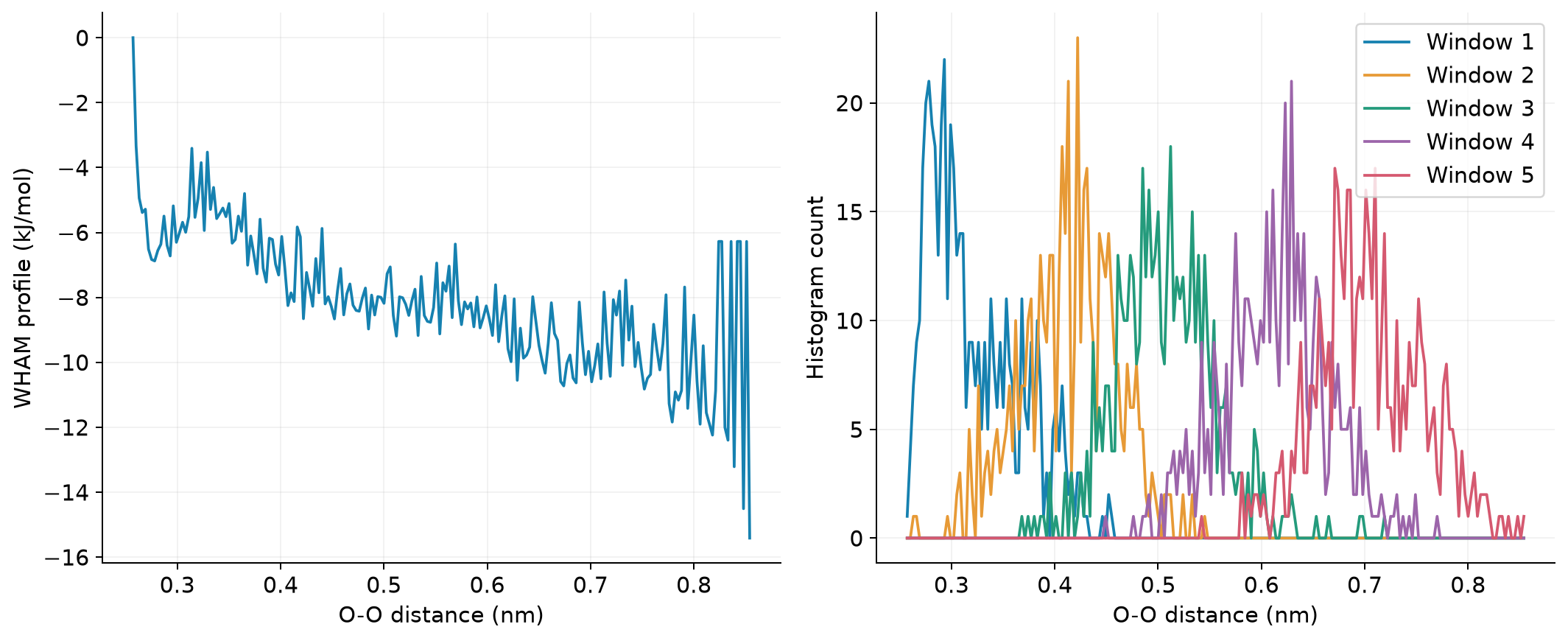
用附件中的 Python 脚本重画所有参考图:
# 回到 gromacs-examples 根目录
module load ase/3.29.0
python plot.py --root .
plot.py 使用 NumPy 和 Matplotlib,直接读取 XVG/COLVAR/坐标数值,图片保存在 figures。对单项新结果,可照着脚本对应段替换文件路径;不要把不同模型或单位的数据直接拼在一起。
参数查阅#
以本集群 gmx 命令名 -h 为准;GROMACS 2026.4 命令手册和MDP 参数手册可查完整选项。