
LAMMPS GPU包与KOKKOS实操对照
GPU包与KOKKOS实操对照,包含可提交输入、实际终端命令、数据和配图。
阅读本篇目录
本文使用鸢算科技集群 LAMMPS 30 Sep 2026 的真实计算。下载输入、参考轨迹、分析脚本与数据图(约 72.5 MB),解压后进入 lammps-examples。cases 保存参考结果,inputs 保存干净输入,使用 new-case.py 创建自己的计算副本。
要完成什么#
本篇对同一 LJ 扰动构型做 run 0,比较 P100/V100 上 GPU 包和 KOKKOS 的能量与力。没有动力学积分的混沌放大,适合检查后端数值是否一致。GPU 包为 mixed 精度,KOKKOS 为独立构建。
必须先加载相应模块,再使用匹配参数:GPU 包采用 -sf gpu -pk gpu 1;KOKKOS 采用 -k on g 1 -sf kk -pk kokkos newton on neigh half gpu/aware off。不要加载 GPU 包构建却使用 kk 启动命令。
后缀只是选择已编译的加速实现,不能让任意 fix/pair 自动支持 GPU。不支持的环节可能回到主机端,部分组合则不允许。多卡、通信与大体系速度请结合现有性能专题;这里的小算例运行秒数不作为速度排名。
1 准备并提交#
python new-case.py backend-p100-gpu
cd work/backend-p100-gpu
sbatch run.sh
run.sh 是本算例匹配的核时 P100 或 V10016G 模板。套餐用户按自己的权限使用 yskit 生成提交脚本,保留下面的计算命令。完整模拟在计算节点执行。其他例子回到资料包根目录,替换目录名后分别提交。
| 目录 | 内容 |
|---|---|
backend-p100-gpu |
独立输入、参考输出和可重跑命令 |
backend-p100-kokkos |
独立输入、参考输出和可重跑命令 |
backend-v100-gpu |
独立输入、参考输出和可重跑命令 |
backend-v100-kokkos |
独立输入、参考输出和可重跑命令 |
2 实际计算命令与输入#
backend-p100-gpu#
mpirun -np 1 lmp -sf gpu -pk gpu 1 -in in.lammps > stdout.log 2>&1
backend-p100-kokkos#
mpirun -np 1 lmp -k on g 1 -sf kk -pk kokkos newton on neigh half gpu/aware off -in in.lammps > stdout.log 2>&1
backend-v100-gpu#
mpirun -np 1 lmp -sf gpu -pk gpu 1 -in in.lammps > stdout.log 2>&1
backend-v100-kokkos#
mpirun -np 1 lmp -k on g 1 -sf kk -pk kokkos newton on neigh half gpu/aware off -in in.lammps > stdout.log 2>&1
下面是 backend-p100-gpu/in.lammps 的完整输入;其他目录的完整输入也在资料包中。
units lj
atom_style atomic
boundary p p p
lattice fcc 0.8
region box block 0 8 0 8 0 8
create_box 1 box
create_atoms 1 box
mass 1 1
pair_style lj/cut 2.5
pair_coeff * * 1 1 2.5
pair_modify shift yes
neighbor 0.3 bin
neigh_modify every 1 delay 0 check yes
thermo 100
thermo_style custom step time atoms temp pe ke etotal press vol density
thermo_modify norm no format float %.12g
displace_atoms all random .01 .01 .01 12842 units box
run 0
write_dump all custom forces.dump id type x y z fx fy fz modify sort id format float %.15g
3 查看输出与实际数据#
tail -n 30 stdout.log
ls -lh
stdout.log 是计算输出;轨迹保存在 trajectory.lammpstrj(适用的算例),结构保存在 final.data。静态扫描和 run 0 对照不一定生成动力学轨迹。以下动态均值取最后一个热力学输出块的后半段;静态结果取对应输出,单位随输入确定。
| 算例 | 原子数 | 平均温度 | 平均密度 | 最后势能 |
|---|---|---|---|---|
backend-p100-gpu |
2048 | 0 | 0.8 | -12128.9126 |
backend-p100-kokkos |
2048 | 0 | 0.8 | -12128.9125 |
backend-v100-gpu |
2048 | 0 | 0.8 | -12128.9126 |
backend-v100-kokkos |
2048 | 0 | 0.8 | -12128.9125 |
LJ/珠簧例子使用约化单位;metal 为 K、g/cm³、eV;水的 real 单位为 K、g/cm³、kcal/mol。势能列是整个体系的总量,跨不同原子数不可直接相比。
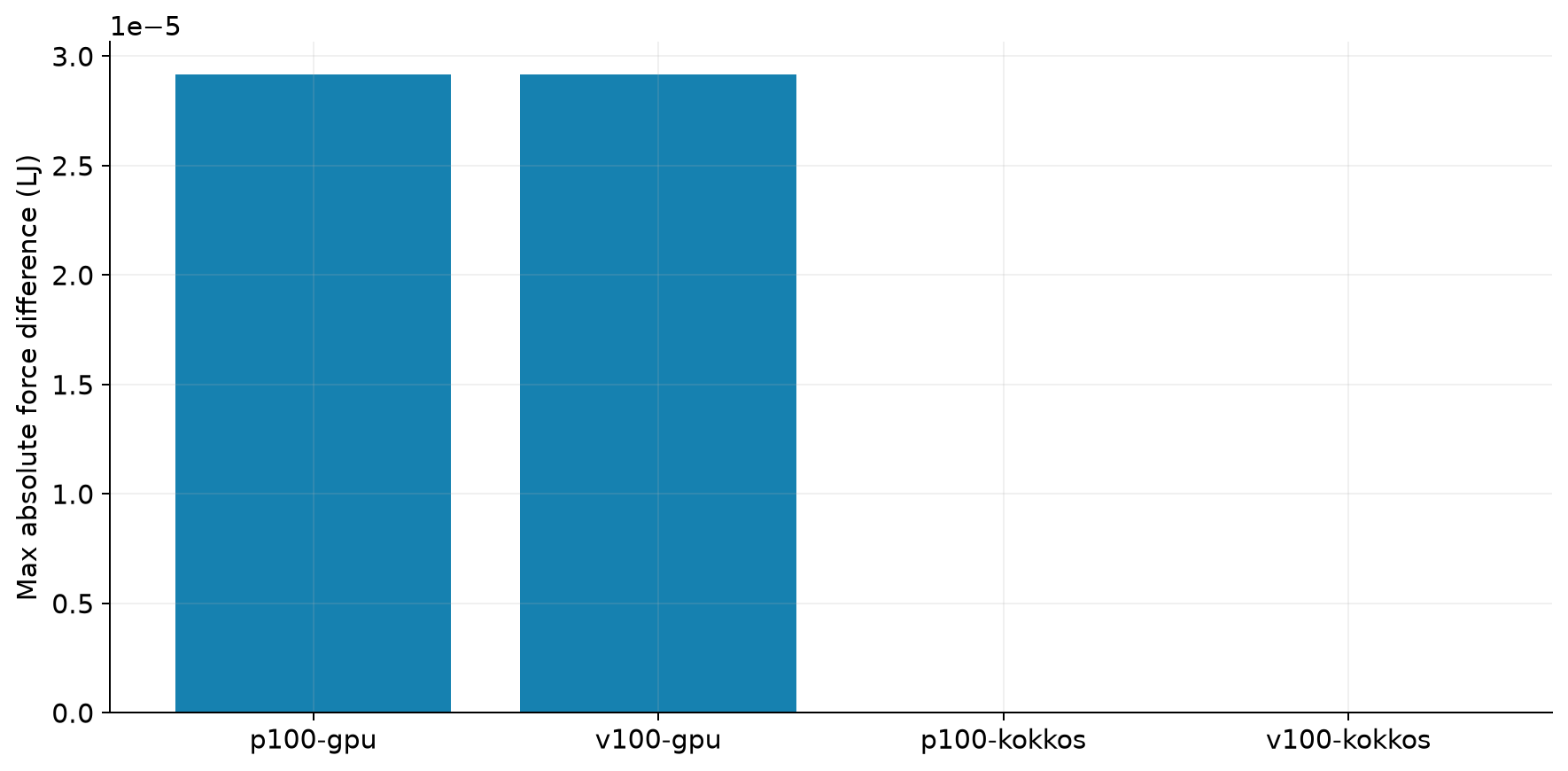
| 后端 | 相对P100 KOKKOS的最大力分量差(LJ) |
|---|---|
| backend-p100-gpu | 2.91865e-05 |
| backend-p100-kokkos | 0 |
| backend-v100-gpu | 2.91865e-05 |
| backend-v100-kokkos | 7.02216e-15 |
4 提取数据与重画#
回到附件根目录,使用已经安装的 ASE Python 环境执行真实数据分析脚本:
module load ase/3.29.0
python analyze.py --root .
ls analysis
ls figures
脚本使用 NumPy/Matplotlib,读取参考日志、轨迹和相关函数,生成 CSV 与 PNG。查看 analyze.py 中本篇对应目录的处理段,可以把路径换成你的新结果。完整脚本按本专题的全部参考目录组织,单个新算例不需要假造其他目录来运行;提取对应段即可。