
LAMMPS循环、续算与轨迹恢复实操
用256原子的短LJ任务练习include、变量循环、restart、read_dump和势函数导出。
阅读本篇目录
本例采用LAMMPS 30Sep2026 P100 GPU构建,以256个Lennard-Jones粒子演示脚本组织和数据恢复。所有量使用LJ约化单位;这是方法练习体系,不把参数直接解释为真实Ni或Cu。
1 准备并提交一个短流程#
下载输入、实际数据和绘图脚本,在新目录中运行:
unzip small-examples-*.zip
cd small-examples-20261027
mkdir -p work/lj
cp lammps/in.* lammps/settings.in lammps/run.sh work/lj/
cd work/lj
sbatch run.sh
squeue -u "$USER"
脚本依次执行300步控制段、续算50步、读取第300步坐标并做零步能量检查,申请一张P100。GPU mixed构建与CPU/KOKKOS double可能有小的浮点差异,比较时保持同一精度分支。
2 把公共设置放进include文件#
pair_style lj/cut 2.5
pair_coeff 1 1 1.0 1.0 2.5
neighbor 0.3 bin
neigh_modify every 1 delay 0 check yes
timestep 0.002
include读取已有设置文件;pair_style、pair_coeff定义LJ相互作用。下面完整主输入通过label、next和jump把100步重复三次;restart每100步保存一次,写出的final.restart可继续使用。
echo both
log control.log
units lj
dimension 3
boundary p p p
atom_style atomic
atom_modify map array sort 100 0.0
processors * * *
newton on
lattice fcc 0.8442
region box block 0 4 0 4 0 4
create_box 1 box
create_atoms 1 box
mass 1 1.0
include settings.in
comm_style brick
comm_modify cutoff 3.0
balance 1.0 shift x 10 1.1
pair_write 1 1 200 r 0.9 3.0 pair-table.txt LJ
write_coeff pair-coeff.in
velocity all create 1.0 27181 mom yes rot no dist gaussian
compute T all temp
compute_modify T extra/dof 3
fix bath all nvt temp 1.0 1.0 0.2
fix_modify bath temp T
thermo 50
thermo_style custom step atoms temp pe ke etotal press
thermo_modify temp T flush yes
run_style verlet
restart 100 restart.*
dump frames all custom 100 trajectory.dump id type x y z vx vy vz
dump_modify frames sort id
variable block loop 3
label segment
run 100
print "completed block ${block}"
next block
jump SELF segment
if "$(atoms)==256" then "print 'atom count is 256'" else "quit 2"
info system
write_data final.data
write_restart final.restart
unfix bath
uncompute T
print "SHORT_CONTROL_FINISHED"
atom_modify控制原子索引映射,comm_modify指定通信截断,compute_modify调整温度自由度,fix_modify让控温使用明确的温度compute。单MPI进程下balance不会展示多进程负载收益,只演示语法与执行位置。pair_write输出势能及径向力表,write_coeff输出系数;不把“成功执行”当作并行性能提升。
3 从检查点继续50步#
units lj
atom_style atomic
read_restart final.restart
include settings.in
fix bath all nvt temp 1.0 1.0 0.2
thermo 10
thermo_style custom step atoms temp pe ke etotal
run 50
write_data continued.data
print "SHORT_RESTART_FINISHED"
read_restart会恢复时间步和状态;需要重新定义相同ID和兼容类型的fix来继续使用它保存的状态。结果推进到第350步。文本data主要描述结构,不等于所有运行状态的完整检查点。
4 读取旧轨迹坐标并核对能量#
units lj
atom_style atomic
pair_style lj/cut 2.5
read_data continued.data
include settings.in
read_dump trajectory.dump 300 x y z box yes replace yes
run 0
write_data restored.data
print "RESTORED_PE $(pe:%.12g)"
print "SHORT_READ_DUMP_FINISHED"
读取含Pair Coeffs的数据文件前先定义pair_style。read_dump恢复第300步位置;本例不读取该帧速度,因此只比较势能,不比较总能或继续称作同一动力学轨迹。
grep 'completed block' stdout.control
grep '350' stdout.restart
grep 'RESTORED_PE' stdout.read-dump
head -12 pair-table.txt
第300步势能约−5.7714023 LJ/atom;按轨迹坐标恢复后为−5.77140714146 LJ/atom,差约4.8×10⁻⁶,来自文本轨迹坐标舍入。需要更精确往返时增加dump输出精度,或使用二进制restart。
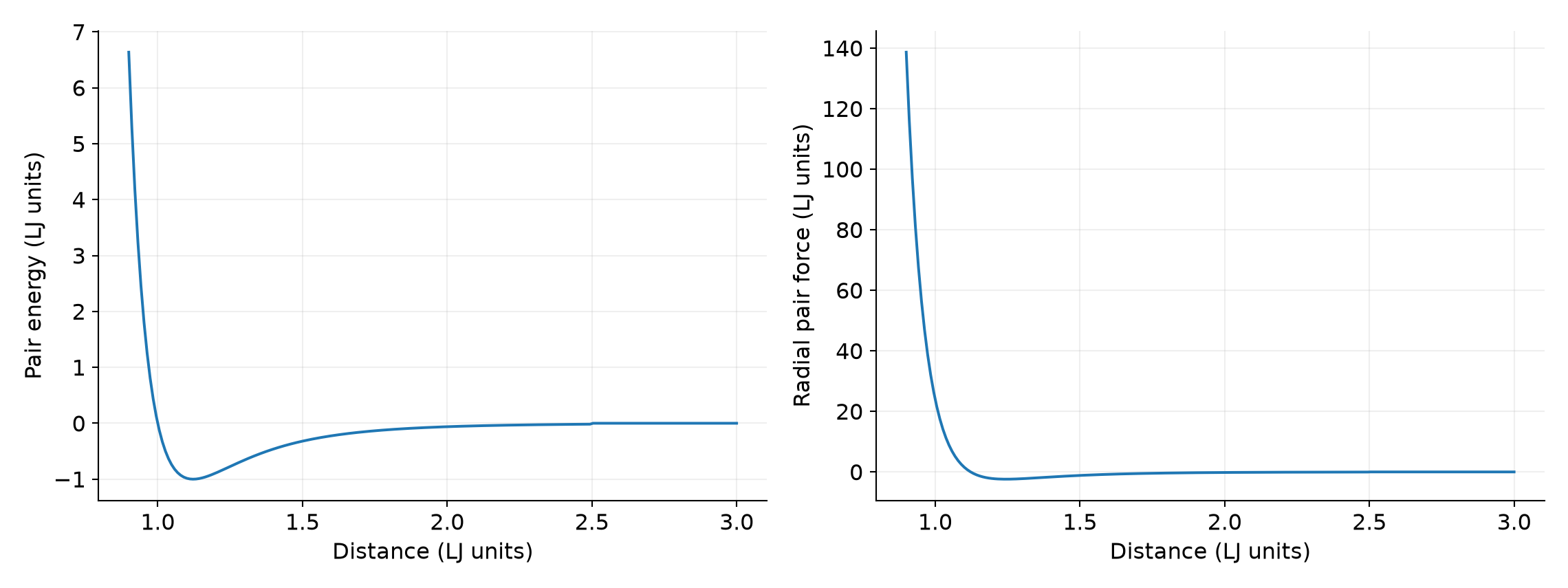
势表已与LJ解析表达式逐点比较。重新绘图时回到解压包根目录:
module load ase/3.29.0
python plot.py
5 用在自己的模型中#
先修改势函数、单位和原子类型,再检查温度自由度、时间步与邻居参数。循环适合组织重复操作;调整温度、压力或应变时要明确哪些参数随循环变化,不能仅凭循环次数认为已得到独立样本。