
GROMACS温控算法与耦合时间实操
216个SPC/E水的实际GPU短MD:完整输入、终端操作、数据与图。
阅读本篇目录
下载16组完整输入、原始日志、能量数据与绘图脚本。所有例子使用同一盒216个SPC/E水分子(648原子),在鸢算科技集群P100上实际运行20 ps。GROMACS 2026.4使用CUDA 12.8、thread-MPI构建;每个任务使用1张GPU、2个CPU线程。建模与最小化见Packmol接GROMACS水盒工作流。
运行步骤#
先解压下载包,进入gromacs-water子目录。下面各个算例互相独立,每次从下载包根目录进入对应目录;为每个需要运行的目录保存一份下方的run.sh。start.gro包含坐标和速度,topol.top引用安装包自带SPC/E参数。下面的脚本在所选算例目录保存为run.sh:
#!/bin/bash
#SBATCH --partition=gpu-8p100-hs
#SBATCH --nodes=1
#SBATCH --ntasks=1
#SBATCH --cpus-per-task=2
#SBATCH --gres=gpu:1
#SBATCH --time=00:20:00
set -eo pipefail
source /etc/profile
module purge
module load gromacs/2026.4-p100-threadmpi
export OMP_NUM_THREADS=2
gmx grompp -f md.mdp -c start.gro -p topol.top -o md.tpr
gmx mdrun -deffnm md -ntmpi 1 -ntomp 2 -nb gpu -pme gpu -bonded cpu -update cpu
if grep -Eq '^pcoupl[[:space:]]*=[[:space:]]*no([[:space:]]|$)' md.mdp; then
  printf 'Potential\nTotal-Energy\nTemperature\nPressure\n0\n' | gmx energy -f md.edr -o thermo.xvg
else
  printf 'Potential\nTotal-Energy\nTemperature\nPressure\nVolume\n0\n' | gmx energy -f md.edr -o thermo.xvg
fi
sbatch run.sh
# 任务结束后检查最后几行日志
 tail -n 20 md.log
constraints = none不代表这里的水是柔性水:SPC/E拓扑含SETTLE,水分子内部几何仍保持刚性。continuation = yes与gen-vel = no保留输入速度。本组从同一GRO起点分叉,GRO速度有输出精度限制,并不是读取同一完整检查点的位级重启。
本例比较什么#
比较v-rescale、Nose–Hoover、Berendsen和随机动力学SD,再改变v-rescale的tau-t。SD使用integrator = sd,不再叠加另一套tcoupl温控。
nvt-v-rescale#
cd nvt-v-rescale
sbatch run.sh
完整 md.mdp:
integrator = md
dt = 0.001
nsteps = 20000
continuation = yes
cutoff-scheme = Verlet
coulombtype = PME
rcoulomb = 0.8
rvdw = 0.8
pbc = xyz
tcoupl = v-rescale
tc-grps = System
tau-t = 0.1
ref-t = 300
pcoupl = no
gen-vel = no
constraints = none
nstenergy = 10
nstxout-compressed = 100
fourierspacing = 0.12
nvt-nose-hoover#
cd nvt-nose-hoover
sbatch run.sh
完整 md.mdp:
integrator = md
dt = 0.001
nsteps = 20000
continuation = yes
cutoff-scheme = Verlet
coulombtype = PME
rcoulomb = 0.8
rvdw = 0.8
pbc = xyz
tcoupl = nose-hoover
tc-grps = System
tau-t = 0.1
ref-t = 300
pcoupl = no
gen-vel = no
constraints = none
nstenergy = 10
nstxout-compressed = 100
fourierspacing = 0.12
nvt-berendsen#
cd nvt-berendsen-demo
sbatch run.sh
完整 md.mdp:
integrator = md
dt = 0.001
nsteps = 20000
continuation = yes
cutoff-scheme = Verlet
coulombtype = PME
rcoulomb = 0.8
rvdw = 0.8
pbc = xyz
tcoupl = berendsen
tc-grps = System
tau-t = 0.1
ref-t = 300
pcoupl = no
gen-vel = no
constraints = none
nstenergy = 10
nstxout-compressed = 100
fourierspacing = 0.12
nvt-sd#
cd nvt-sd
sbatch run.sh
完整 md.mdp:
integrator = sd
dt = 0.001
nsteps = 20000
continuation = yes
cutoff-scheme = Verlet
coulombtype = PME
rcoulomb = 0.8
rvdw = 0.8
pbc = xyz
tcoupl = no
tc-grps = System
tau-t = 0.1
ref-t = 300
pcoupl = no
gen-vel = no
constraints = none
nstenergy = 10
nstxout-compressed = 100
fourierspacing = 0.12
ld-seed = 27129
thermostat-tau-0.05#
cd thermostat-tau-0.05
sbatch run.sh
完整 md.mdp:
integrator = md
dt = 0.001
nsteps = 20000
continuation = yes
cutoff-scheme = Verlet
coulombtype = PME
rcoulomb = 0.8
rvdw = 0.8
pbc = xyz
tcoupl = v-rescale
tc-grps = System
tau-t = 0.05
ref-t = 300
pcoupl = no
gen-vel = no
constraints = none
nstenergy = 10
nstxout-compressed = 100
fourierspacing = 0.12
thermostat-tau-0.5#
cd thermostat-tau-0.5
sbatch run.sh
完整 md.mdp:
integrator = md
dt = 0.001
nsteps = 20000
continuation = yes
cutoff-scheme = Verlet
coulombtype = PME
rcoulomb = 0.8
rvdw = 0.8
pbc = xyz
tcoupl = v-rescale
tc-grps = System
tau-t = 0.5
ref-t = 300
pcoupl = no
gen-vel = no
constraints = none
nstenergy = 10
nstxout-compressed = 100
fourierspacing = 0.12
实际结果#
| 条件 | 10–20 ps平均温度/K | 温度时间波动标准差/K | 平均压力/bar | 最终体积/nm³ |
|---|---|---|---|---|
| nvt-v-rescale | 300.831 | 12.266 | 356.27 | 6.461670 |
| nvt-nose-hoover | 300.046 | 13.336 | 548.01 | 6.461670 |
| nvt-berendsen | 300.475 | 9.146 | 303.79 | 6.461670 |
| nvt-sd | 300.487 | 11.415 | 414.60 | 6.461670 |
| thermostat-tau-0.05 | 300.878 | 11.616 | 466.45 | 6.461670 |
| thermostat-tau-0.5 | 298.614 | 11.151 | 529.60 | 6.461670 |
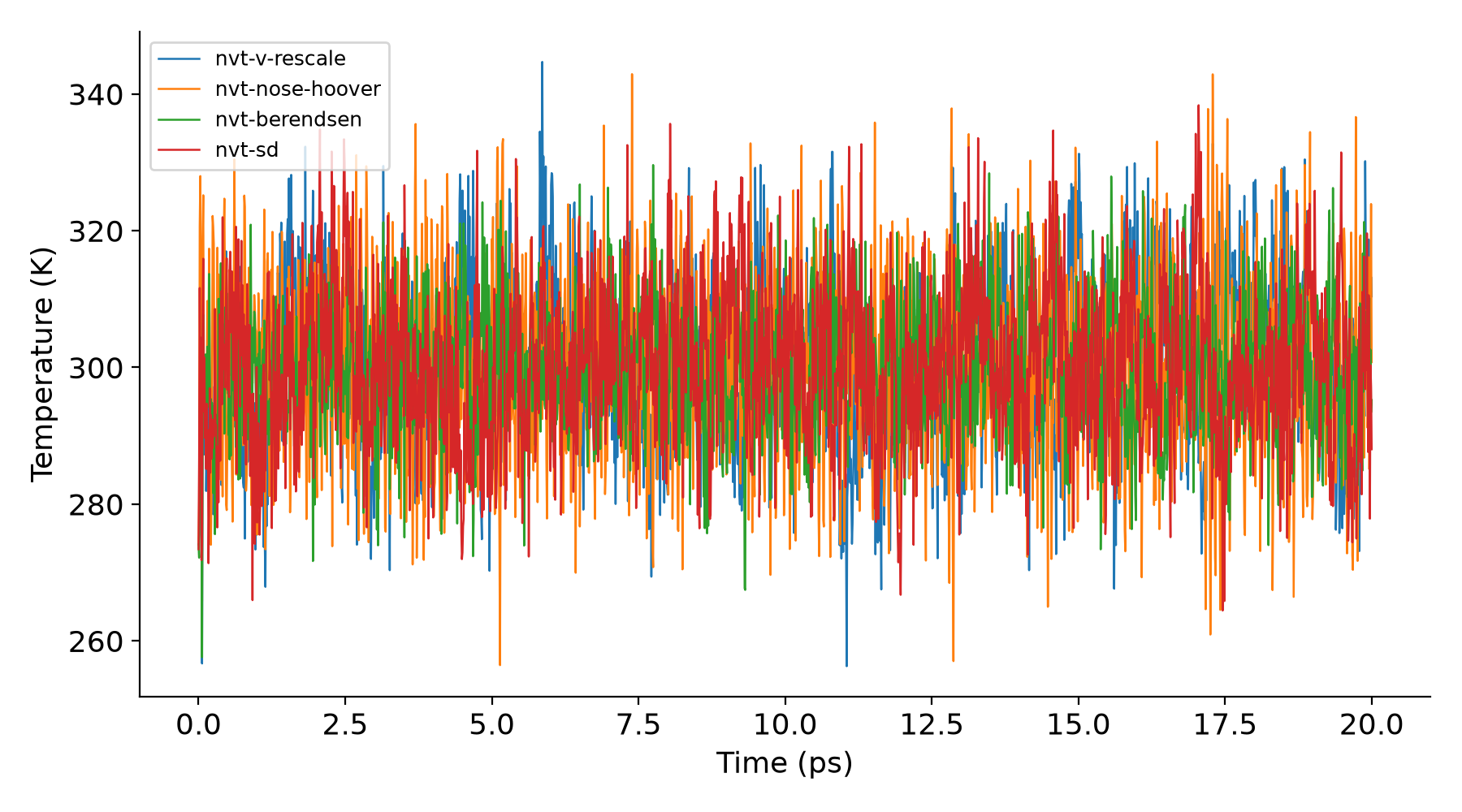
Berendsen仅用于认识旧算法,不能产生正确的动能分布,不推荐用于需要严格系综的生产统计。它的预处理会明确警告;本包-demo目录为有意演示,在确认只有这一项警告后使用grompp -maxwarn 1。不要把-maxwarn 1作为通用解决错误的方法。温度平均值接近目标并不足以证明采样正确。
表中的标准差是轨迹自身的时间波动,不是平均值误差条。
提取与画图#
返回下载包根目录:
module purge
module load gpumdkit/1.5.8
python analyze.py
得到analysis/RESULTS.json和六幅PNG曲线。脚本按XVG列名读取数据;定容任务的体积从GRO盒矢量取得。NPT若重新提取体积,使用:
printf 'Volume\n0\n' | gmx energy -f md.edr -o volume.xvg
这些例子用于学会修改输入、提交任务、检查输出和解读曲线。换成蛋白、界面或其他力场时,需要重新选择合理的截断、耦合时间与模拟长度。