
LAMMPS拓扑编辑与分子模板
显式创建和删除拓扑,重置分子编号,原生molecule与JSON模板往返并真实插入结构。
阅读本篇目录
建立分子模型时,原子坐标之外还要管理键、键角、二面角、improper以及分子编号。本篇实际把一条四站点链拆成两个连接片段,并将分子模板写为JSON、重新读取和插入模拟盒。
下载六组完整输入、实际原生输出、势能表、JSON与绘图脚本,解压进入run.sh目录。
1 提交与目录#
sbatch submit.slurm
模板为核时P100分区1GPU1CPU,顺序完成六组很小的原生工作流,再自动提取与绘图。这里调用lammps/30Sep2026-p100-gpu,但未启用加速后缀,演示的是其CPU执行路径;这不是GPU性能测试。构建为GNU C++13.3.0/C++17、Open MPI5.0.10,分析使用ASE3.29.0中的NumPy与Matplotlib环境。
套餐用户用yskit生成所属分区脚本,在分配资源中执行bash run.sh;不要在登录节点运行计算。inputs是干净输入,reference是本文实际输出,work是新结果;已有work重新解压。
只想手动练习一个输入时,在已分配资源中复制对应目录,再进入它:
cp -r inputs/bonded-tables my-tables
cd my-tables
module load lammps/30Sep2026-p100-gpu
export OMP_NUM_THREADS=1
lmp -in in.lammps
单独目录不经过整套分析脚本;完整绘图与检查使用前面的提交方式。
2 创建、删除与重建完整输入#
units real
atom_style full
boundary f f f
region box block -10 20 -10 20 -10 20
create_box 1 box bond/types 1 angle/types 1 dihedral/types 1 improper/types 1 extra/bond/per/atom 4 extra/angle/per/atom 4 extra/dihedral/per/atom 2 extra/improper/per/atom 2 extra/special/per/atom 8
mass 1 12.0
pair_style zero 8.0
pair_coeff * *
bond_style harmonic
bond_coeff 1 100.0 1.5
angle_style harmonic
angle_coeff 1 50.0 109.47
dihedral_style opls
dihedral_coeff 1 1.0 0.5 0.2 0.0
improper_style harmonic
improper_coeff 1 10.0 0.0
labelmap atom 1 C
labelmap bond 1 CC
labelmap angle 1 CCC
labelmap dihedral 1 CCCC
labelmap improper 1 IMP
bond_coeff CC 100.0 1.5
angle_coeff CCC 50.0 109.47
dihedral_coeff CCCC 1.0 0.5 0.2 0.0
improper_coeff IMP 10.0 0.0
create_atoms 1 single 0 0 0
create_atoms 1 single 1.5 0 0
create_atoms 1 single 2.0 1.4 0
create_atoms 1 single 2.7 1.7 1.2
set atom * mol 1
create_bonds single/bond 1 1 2
create_bonds single/bond 1 2 3
create_bonds single/bond 1 3 4
create_bonds single/angle 1 1 2 3
create_bonds single/angle 1 2 3 4
create_bonds single/dihedral 1 1 2 3 4
create_bonds single/improper 1 1 2 3 4
thermo_style custom step atoms pe ebond eangle edihed eimp
thermo_modify norm no
run 0
write_data before.data
delete_bonds all multi remove special
create_bonds single/bond 1 1 2
create_bonds single/bond 1 3 4
reset_atoms mol all compress yes
reset_atoms image all
reset_atoms id sort yes
run 0
write_data after.data
write_dump all custom atoms.dump id mol type x y z modify sort id
create_box预留相应类型、每原子拓扑和special邻居容量。labelmap提供类型标签,本例在coeff命令中用CC、CCC、CCCC和IMP;此版本create_bonds single/bond的类型位置仍使用整数1,不把标签直接填进去。
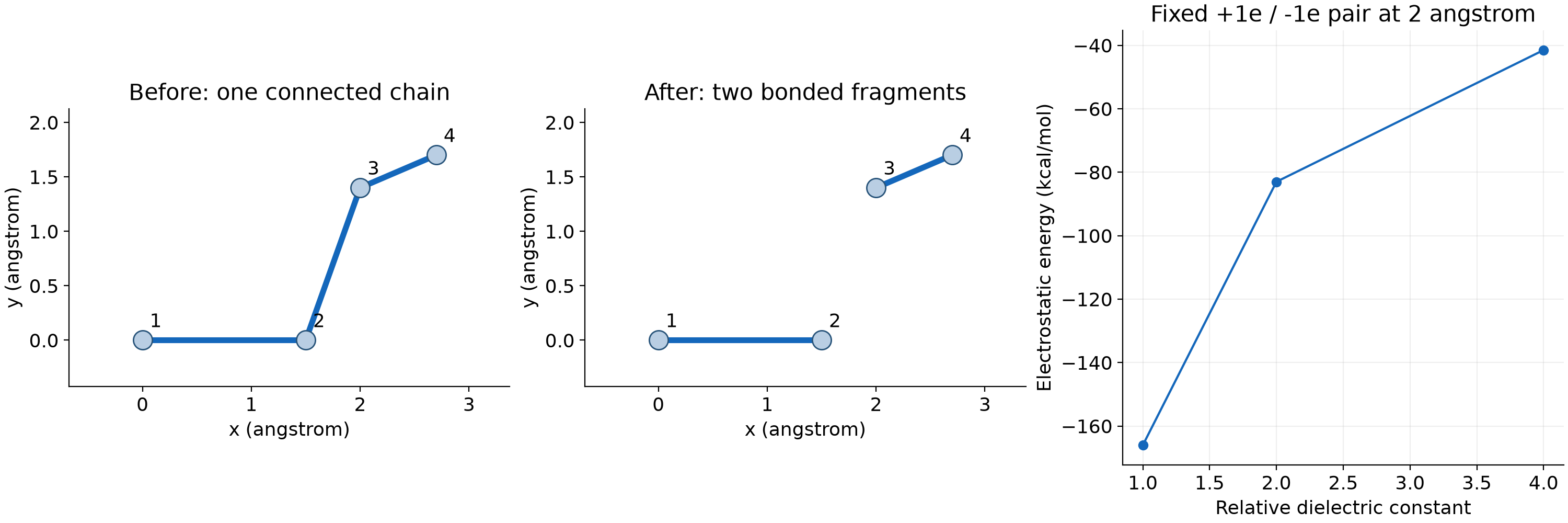
delete_bonds all multi remove special同时移除所选拓扑并重建1–2/1–3/1–4关系。若只关闭键项,定义和special权重关系可能仍保留;是否使用remove和special,应按后续相互作用的意图选择。
重新创建1–2和3–4两条键后,reset_atoms mol all按照新的连接关系重新分配分子号,reset_atoms image all保持跨周期分子的图像标志一致,reset_atoms id sort yes重新连续编号并同步拓扑中的原子ID。修改编号后,应按新编号解释所有输出。
3 实际拓扑变化#
| 项目 | 编辑前 | 编辑后 |
|---|---|---|
| 原子 | 4 | 4 |
| 键 | 3 | 2 |
| 键角 | 2 | 0 |
| 二面角 | 1 | 0 |
| improper | 1 | 0 |
| 连接片段 | 1 | 2 |
这里明确删除了角项,再重建两条独立键;这一步是教学拓扑操作,不能把它解释为对真实化学反应的能量描述。两条键对应的分子号分别为1和2。
grep -E ' atoms$| bonds$| angles$| dihedrals$| impropers$' work/cases/topology-edit/before.data
grep -E ' atoms$| bonds$| angles$| dihedrals$| impropers$' work/cases/topology-edit/after.data
4 分子模板原文#
下面是molecule-roundtrip目录的chain.mol,保留原子、类型、零电荷和各项拓扑:
Four-site educational topology (not a fitted molecular force field)

4 atoms
3 bonds
2 angles
1 dihedrals
1 impropers

Coords

1 0.0 0.0 0.0
2 1.5 0.0 0.0
3 2.0 1.4 0.0
4 2.7 1.7 1.2

Types

1 1
2 1
3 1
4 1

Charges

1 0.0
2 0.0
3 0.0
4 0.0

Bonds

1 1 1 2
2 1 2 3
3 1 3 4

Angles

1 1 1 2 3
2 1 2 3 4

Dihedrals

1 1 1 2 3 4

Impropers

1 1 1 2 3 4
5 原生模板与JSON往返#
units real
atom_style full
boundary f f f
region box block -10 20 -10 20 -10 20
create_box 1 box bond/types 1 angle/types 1 dihedral/types 1 improper/types 1 extra/bond/per/atom 4 extra/angle/per/atom 4 extra/dihedral/per/atom 2 extra/improper/per/atom 2 extra/special/per/atom 8
mass 1 12.0
pair_style zero 8.0
pair_coeff * *
bond_style harmonic
bond_coeff 1 100.0 1.5
angle_style harmonic
angle_coeff 1 50.0 109.47
dihedral_style opls
dihedral_coeff 1 1.0 0.5 0.2 0.0
improper_style harmonic
improper_coeff 1 10.0 0.0
molecule original chain.mol
write_molecule original chain.json
molecule restored chain.json
write_molecule restored roundtrip.mol
create_atoms 0 single 5.0 5.0 5.0 mol restored 42791 rotate 0 0 0 1
thermo_style custom step atoms pe ebond eangle edihed eimp
thermo_modify norm no
run 0
write_data restored.data
write_dump all custom atoms.dump id mol type x y z modify sort id
molecule original读取原生模板,write_molecule original chain.json生成JSON,再用molecule restored读取该JSON。write_molecule restored roundtrip.mol写回原生文本,最后create_atoms ... mol restored实际向盒中插入分子。
write_molecule写的是已定义的分子模板,并不是直接把任意当前模拟盒或任意group导出成分子模板;需要先按molecule格式定义模板。原生与JSON输出可能重新排序,检查应比较类型、连接关系与几何,而不是只比较文本是否完全相同。
本例插入后仍为4原子、3键、2角、1二面角、1improper;脚本逐对检查原子距离,确认模板往返与平移没有改变结构。
python3 -c "import json; d=json.load(open('work/cases/molecule-roundtrip/chain.json')); print(d['units']); print(d['bonds']['data']); print(d['angles']['data'])"
提取与重画#
module load ase/3.29.0
python analyze.py work
python plot_results.py work
python check_results.py work
ls work/figures
cat work/analysis/coulomb.csv
分析检查原生日志是否完成、势能表与解析表达式、拓扑数量和实际电荷对的能量/力。查看本文参考数据时把work改成reference。四站点模型是人为设置的教学结构,参数用于解释命令,没有拟合为某个真实分子的完整力场。
官方参数:create_bonds、delete_bonds、reset_atoms、write_molecule。write_molecule为较新版本入口,旧版不能直接照搬。