
LAMMPS成键断键与真实分子片段
用四珠子实际成键、断键和反例说明拓扑更新、片段识别与moleculeID差异,附完整输入与数据。
阅读本篇目录
希望在粗粒化聚合物中按距离创建连接,或在拉伸后删除拓扑键,可以使用 fix bond/create、fix bond/break。这类规则操作要配套检查真实键表和连通分量,不能只看原始分子编号。
下载三篇共用的完整输入、反应模板、原生科学输出和绘图包。保存为 example.zip,在自己的目录解压:
python3 -m zipfile -e example.zip .
cd lammps-reactions
sbatch job.slurm
CPU分区按56核整节点规则申请,本例顺序实际使用1核;CPU队列维护时请待恢复,不在登录节点运行生产计算。在已经分配的CPU作业内,可直接 bash run.sh。脚本依次运行七个小例子、分析和绘图,三篇共用同一次运行,不需重复提交。
使用LAMMPS22Jul2025 Update6 CPU、oneAPI2024.2与Intel MPI2021.13;程序链接现有PLUMED2.9.4,本例不加偏置。绘图用sisl0.16.4。生成 VALIDATION.json、完整 analysis-fields.npz 和 plots/;reference-results/保留本文原始科学结果。
1. 先认识四珠子模型#
类型1/2是通用模型位点,不对应化学元素。使用约化单位 units lj、谐键势 10(r−1)²,非键相互作用设为零。前六个条件固定坐标,通过两步运行触发明确规则,便于看清“哪条键发生变化”;不是材料反应动力学或断裂速率。
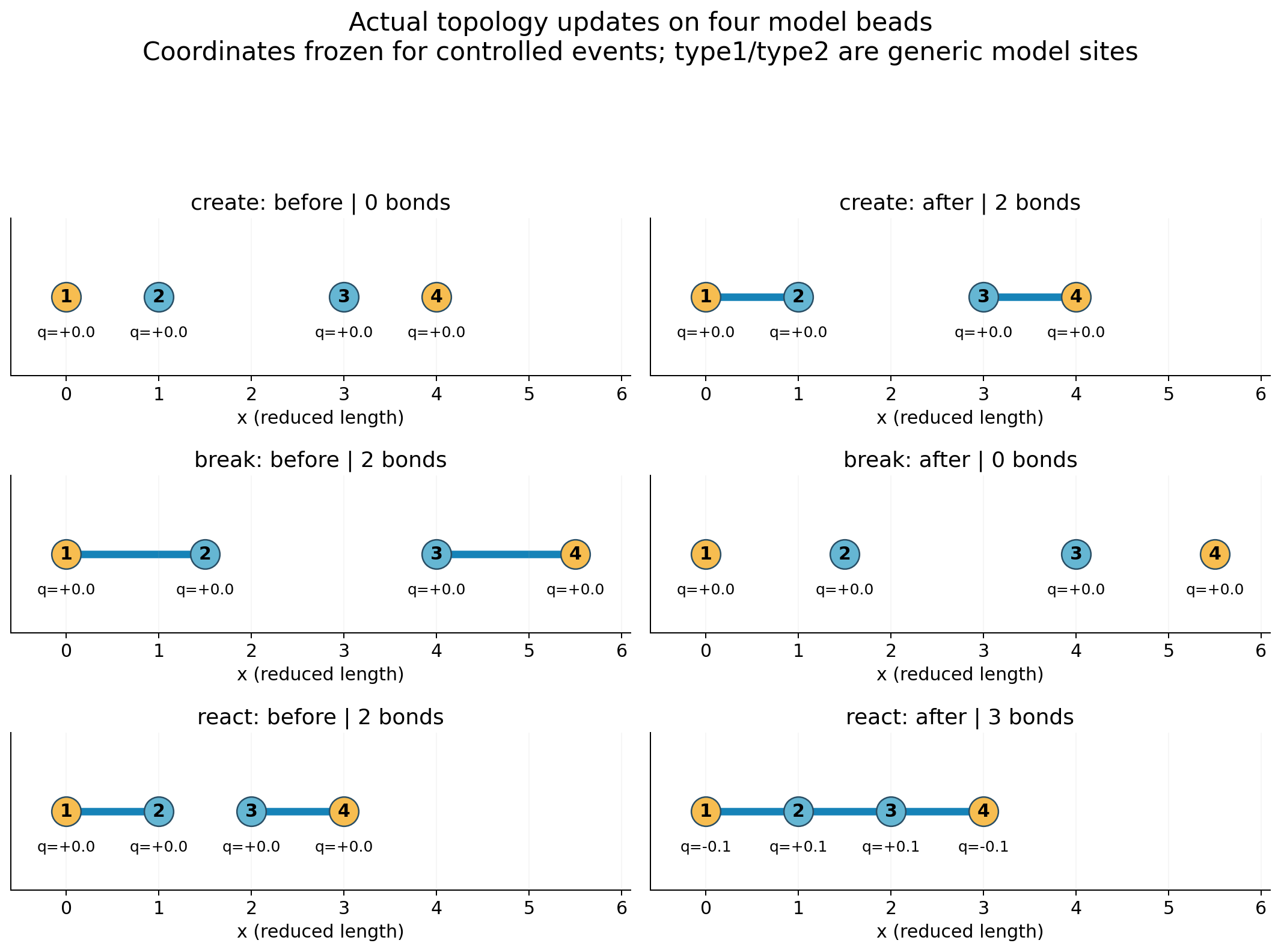
四个孤立位点的完整数据为:
Owned four-bead controlled topology example

4 atoms
0 bonds
2 atom types
1 bond types

-5 15 xlo xhi
-5 15 ylo yhi
-5 15 zlo zhi

Masses

1 1
2 1

Atoms # full

1 1 1 0 0 0 0
2 2 2 0 1 0 0
3 3 2 0 3 0 0
4 4 1 0 4 0 0
Atoms # full中各列是 id,molecule-ID,type,q,x,y,z。这里原来给四个位点分别编号1、2、3、4,后面会看到创建拓扑键并不会自动更改这些编号。
2. 创建两条键#
cat inputs/create/input.lammps
cat inputs/create/final.data
实际完整输入:
units lj
atom_style full
boundary f f f
read_data start.data extra/bond/per/atom 4 extra/special/per/atom 8
pair_style zero 6.0
pair_coeff * *
bond_style harmonic
bond_coeff 1 10.0 1.0
special_bonds lj 0 0 0 coul 0 0 0
neighbor 1.0 bin
neigh_modify every 1 delay 0 check yes
compute fragments all fragment/atom single yes
compute qa all property/atom q
compute totalq all reduce sum c_qa
fix freeze all setforce 0 0 0
fix integrate all nve
thermo 1
thermo_style custom step atoms bonds pe c_totalq
thermo_modify norm no format float %.17g
dump atoms all custom 1 atoms.dump id mol type q x y z c_fragments
dump_modify atoms sort id format float %.17g
timestep 0.001
fix event all bond/create 1 1 2 1.2 1 iparam 1 1 jparam 1 2 prob 1 46617
run 2
write_data final.data nocoeff
extra/bond/per/atom和extra/special/per/atom为后续新增拓扑预留容量。fix event all bond/create 1 1 2 1.2 1表示每步检查类型1与类型2,距离小于1.2时可以建立类型1的键。iparam/jparam限制每个位点最多建立1条此类键;本例达到上限后仍保持原类型。prob 1使符合条件的配对必定尝试。
结果第1步由0条变为2条键,即1–2与3–4;第2步仍为2条。create-prob0保持相同几何和参数,只将概率置0,结果始终0条键。
3. 拉长的两条键与断键阈值#
inputs/break/start.data中两条初始键长均为1.5。断键命令:
fix event all bond/break 1 1 1.2 prob 1 46619
表示每步检查类型1的键,超过1.2时允许删除。两条键均在第1步断开,末态0条键、4个独立片段。对照 break-below-threshold 将阈值改成2.0,键长1.5没有超过阈值,末态仍2条键。
cat inputs/break/input.lammps
cat inputs/break/atoms.dump
cat inputs/break/final.data
本例冻结位置,因此可以独立由实际键长算出断键前谐键总能为 2×10×(1.5−1)²=5,断键后为0。被删除的势能不自动转成原子动能;不能把这种规则删键当成能量守恒的真实化学反应。
4. 分子ID与真正的连通片段#
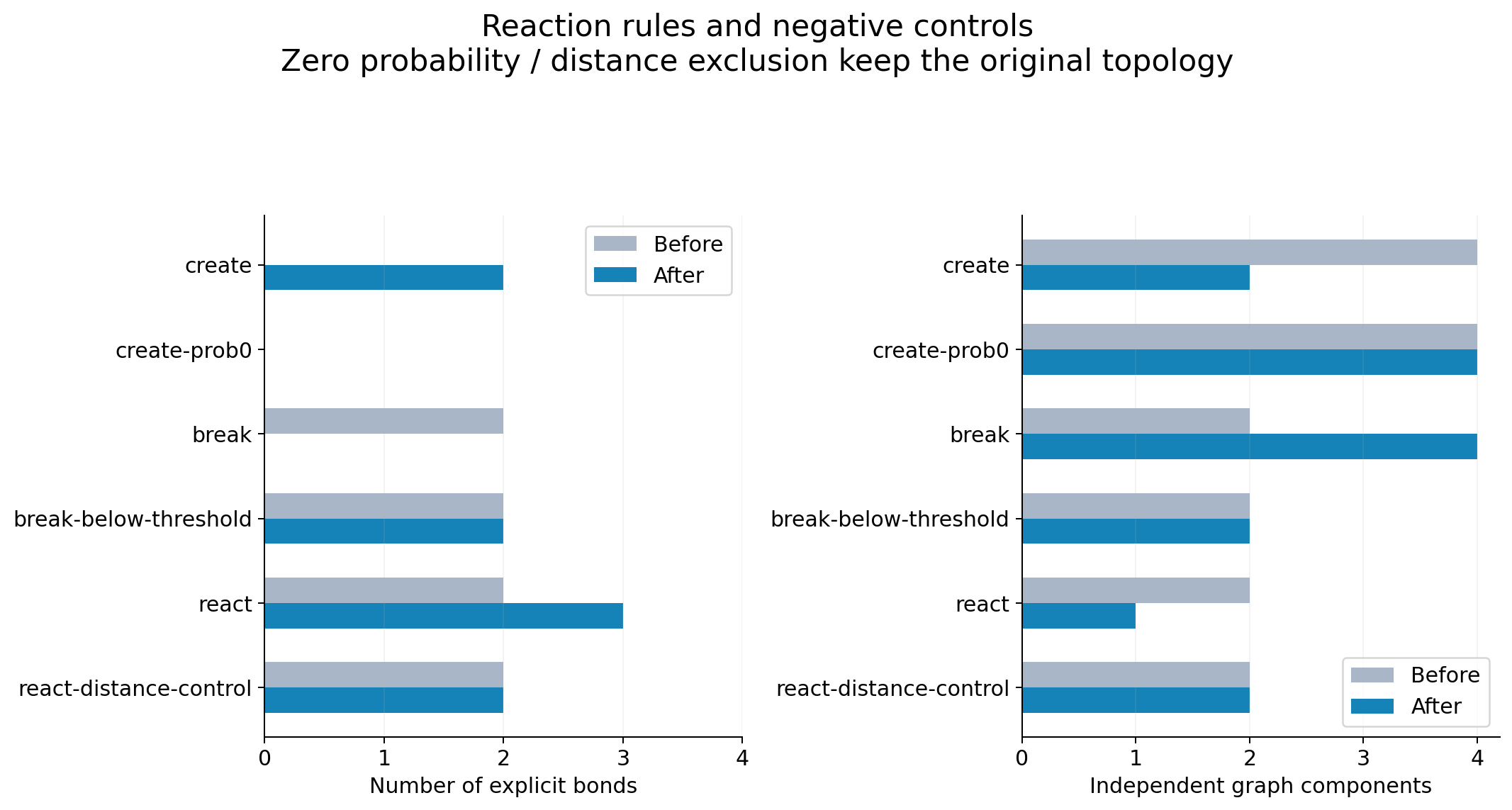
| 条件 | 键数 | 真实连通片段数 | 不同molecule-ID数量 |
|---|---|---|---|
| create | 0→2 | 4→2 | 4→4 |
| create-prob0 | 0→0 | 4→4 | 4→4 |
| break | 2→0 | 2→4 | 2→2 |
| break-below-threshold | 2→2 | 2→2 | 2→2 |
创建两条键后,真实片段从4变2,但原molecule-ID仍有4种;断键后真实片段从2变4,原molecule-ID仍只有2种。compute fragments all fragment/atom single yes从实际键表识别片段,包含孤立原子;dump里的 c_fragments 可用于检查。分子ID只是存储字段,不总是当前拓扑的分子划分。
分析脚本按 final.data 的完整键表独立构图,逐帧核对片段、原子编号、类型、净电荷和谐键能量。只想再检查、重画已有输出:
module load sisl/0.16.4
python analyze.py
python plot.py
如果需要同时改变一组键、类型和部分电荷,继续阅读反应模板;基于连续键级识别实际物种则看ReaxFF物种统计。官方说明:bond/create、bond/break。