
LAMMPS分子质心速度自相关与续算
用六个粒子、两个固定分组实际演示vacf/chunk、质心速度、MSD、整体漂移和restart续算,附完整输入、解析对照、数据与图片。
阅读本篇目录
如果关注的是一个分子或团簇整体如何移动,可以先按固定成员分组,再计算每一组的质心速度自相关。LAMMPS的compute vacf/chunk给出每组初始质心速度与当前质心速度的乘积;它与逐原子VACF的平均不是同一个量。
本篇用6个点粒子分成两个molecule-ID组,每组质量为1、2、1,外加很小的恒力。没有键和粒子间势,目的是让运动可以直接用解析公式核对。这是操作教学体系,不是实际分子模型,也不能据此计算平衡扩散系数。 所有长度、时间、速度均为LJ约化单位。
1.先查看实际结果#
下载质心VACF实例包,进入lammps-chunk-VACF:
bash read.sh
bash plot.sh
数据在analysis/LAMMPS-chunk-VACF.csv,图片在figures/。要重新运行:
bash prepare.sh
bash run.sh
bash read.sh work-new analysis-new
bash plot.sh analysis-new figures-new
run.sh加载lammps/30Sep2026-8173m,单MPI、单线程,依次运行基准20步、速度漂移20步、分段10步与restart续跑10步。包内不附二进制restart;重新运行时由自己的split10目录产生。已有work-new不会自动覆盖。
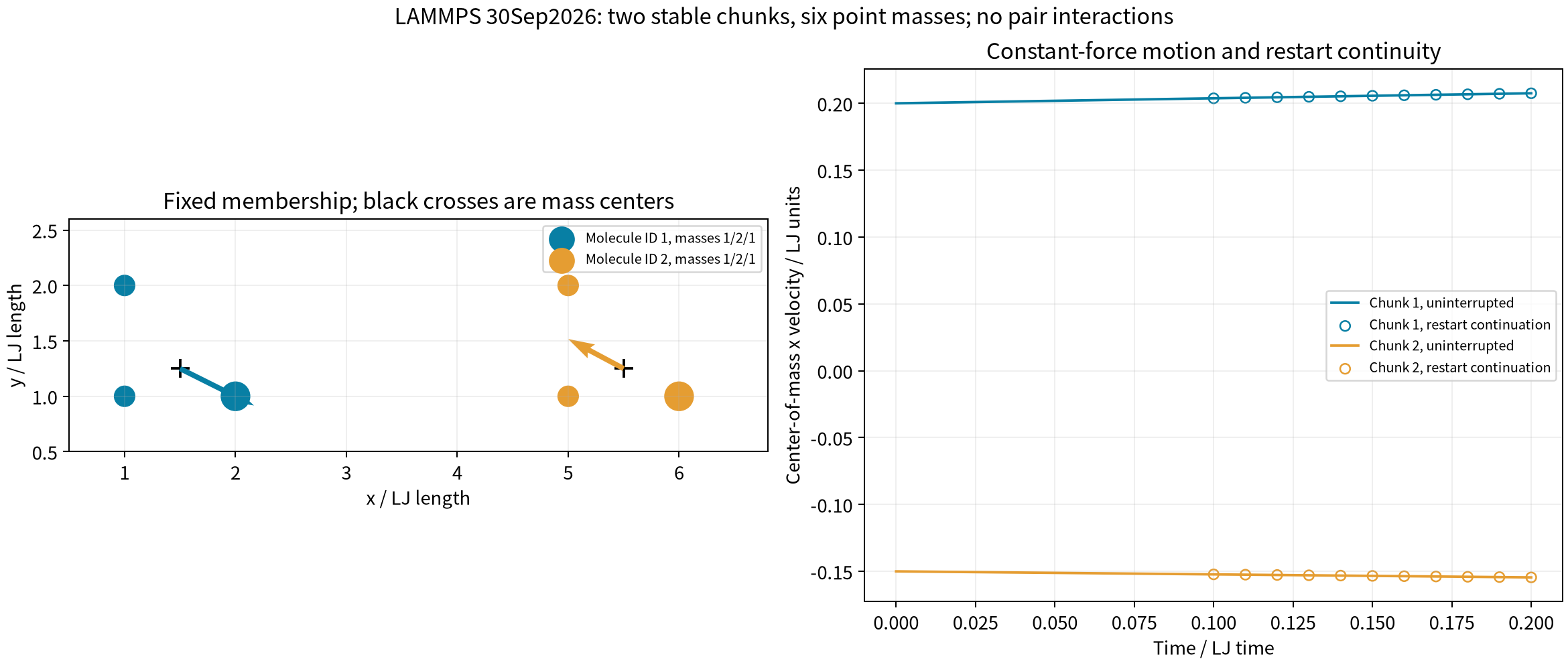
2.基准计算:完整输入#
base/in.lammps如下。分子编号只用来定义固定分组,不会自动产生化学键。pair_style zero使粒子间作用为零,两组外加力由fix addforce指定。
units lj
atom_style molecular
boundary f f f
region box block 0 10 0 5 0 5
create_box 2 box
mass 1 1
mass 2 2
create_atoms 1 single 1 1 1 units box
set atom 1 mol 1
group A1 id 1
velocity A1 set 0.30000000000000004 -0.10000000000000001 0.050000000000000003 units box
create_atoms 2 single 2 1 1 units box
set atom 2 mol 1
group A2 id 2
velocity A2 set 0.15000000000000002 -0.080000000000000002 0.050000000000000003 units box
create_atoms 1 single 1 2 1 units box
set atom 3 mol 1
group A3 id 3
velocity A3 set 0.20000000000000001 -0.14000000000000001 0.050000000000000003 units box
create_atoms 1 single 5 1 1 units box
set atom 4 mol 2
group A4 id 4
velocity A4 set -0.049999999999999989 0.080000000000000002 0.02 units box
create_atoms 2 single 6 1 1 units box
set atom 5 mol 2
group A5 id 5
velocity A5 set -0.20000000000000001 0.10000000000000001 0.02 units box
create_atoms 1 single 5 2 1 units box
set atom 6 mol 2
group A6 id 6
velocity A6 set -0.14999999999999999 0.040000000000000001 0.02 units box
pair_style zero 1
pair_coeff * *
group G1 molecule 1
group G2 molecule 2
fix F1 G1 addforce .05 .02 -.01
fix F2 G2 addforce -.03 .04 .02
fix MOVE all nve
compute CH all chunk/atom molecule nchunk once ids once
compute VC all vcm/chunk CH
compute AC all vacf/chunk CH
compute MS all msd/chunk CH
fix OBS all ave/time 1 1 1 c_VC[*] c_AC[*] c_MS[*] file chunks.dat mode vector format " %.17g"
dump AT all custom 1 atoms.dump id mol type x y z vx vy vz fx fy fz
dump_modify AT sort id format float %.17g
timestep .01
thermo 1
thermo_style custom step time ke
thermo_modify norm no format float %.17g
run 20
write_restart state.restart
重点看下面几条命令:
compute CH all chunk/atom molecule nchunk once ids once
compute VC all vcm/chunk CH
compute AC all vacf/chunk CH
compute MS all msd/chunk CH
nchunk once ids once固定组数和原子归属;VC输出各组质心速度,AC输出速度自相关,MS输出质心位移平方。这里使用质量加权质心,不能把质量1、2、1的三个粒子简单做算术平均。
如果换成真实分子,要先用适合材料的势函数和正确的拓扑完成平衡,再设置相关分析。固定molecule-ID适合跟踪相同成员;不断有原子进出的空间分箱不能直接视为同一个分子的连续轨迹。
3.读取输出各列#
head work-new/base/chunks.dat
fix ave/time以mode vector输出。每个时间步先写步号和组数,随后每组一行,第一列为行号,后面依次是:
| 数据段 | 内容 |
|---|---|
c_VC[1..3] |
质心速度x、y、z |
c_AC[1..3] |
VCMx(0)VCMx(t)、VCMy(0)VCMy(t)、VCMz(0)VCMz(t) |
c_AC[4] |
三方向自相关之和 |
c_MS[1..3] |
质心位移Δx²、Δy²、Δz² |
c_MS[4] |
质心总位移平方 |
vacf/chunk没有自动除以初始值,也不自动做多个时间原点平均。它逐组返回结果,不会自动把不同分子的VACF平均成一条曲线。
本例第一组初始质心速度为(0.2,-0.1,0.05),总质量4,三粒子总力为3×(0.05,0.02,-0.01)。因此质心加速度为(0.0375,0.015,-0.0075)。在t=0.2时,质心速度为(0.2075,-0.097,0.0485),VACF总量为0.053625,与实际输出一致。
4.为什么整体漂移会改变VACF#
第二个计算给所有粒子速度统一增加(2,-0.3,0),力、质量与初始结构保持相同。该例的boost/in.lammps已在包内。
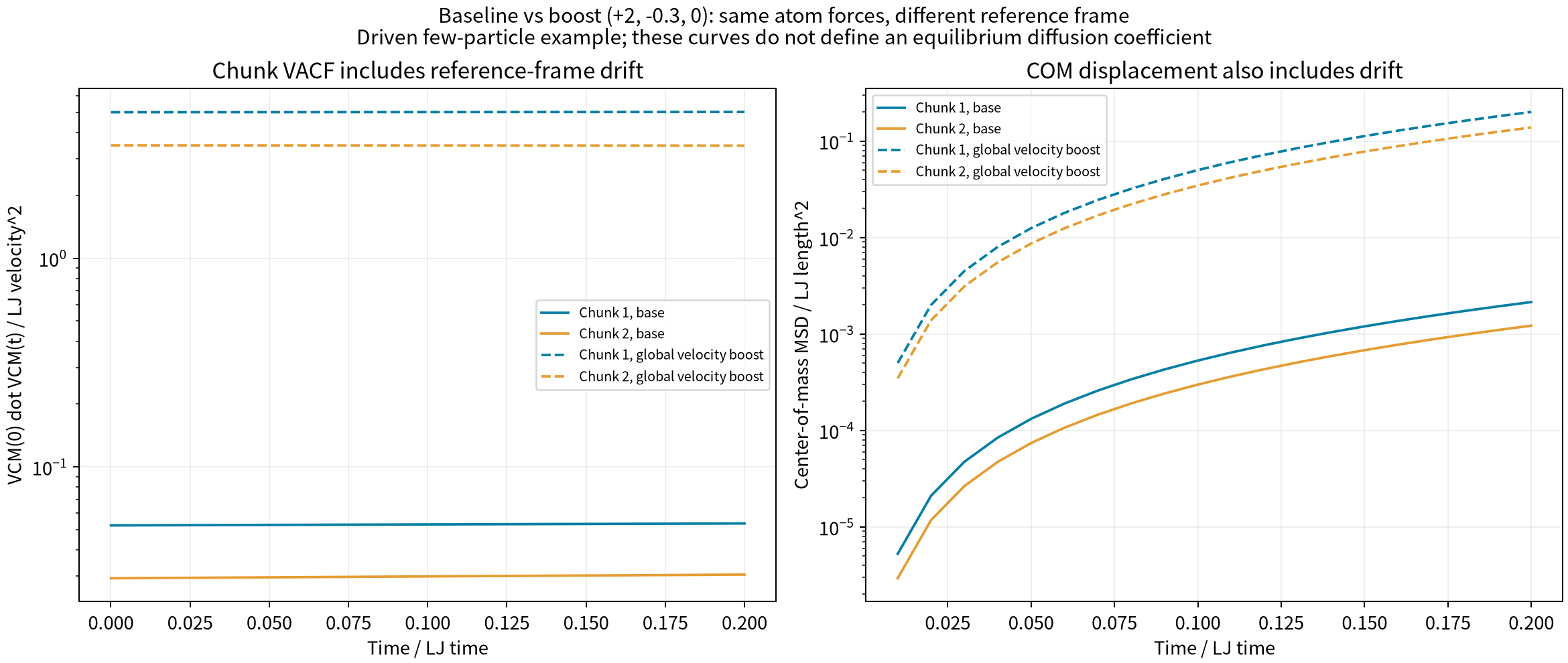
增加一个共同速度并不会被这个compute自动消掉:VCM(0)·VCM(t)同时包含整体漂移。MSD也含有漂移造成的位移。图中同一颜色表示同一个分组,虚线是增加整体速度后的结果。
对于平衡扩散问题,应先明确参考系、移除非物理整体漂移,保留合理的分子平移运动,并使用足够的平衡采样和时间统计。不能把外力驱动、持续加速的这两条曲线直接积分后称作材料扩散系数。
5.restart怎样保留原始参考速度#
split10/in.lammps与基准相同,只运行10步后写state.restart。接下来的完整续算输入是:
units lj
read_restart ../split10/state.restart
group G1 molecule 1
group G2 molecule 2
fix F1 G1 addforce .05 .02 -.01
fix F2 G2 addforce -.03 .04 .02
fix MOVE all nve
compute CH all chunk/atom molecule nchunk once ids once
compute VC all vcm/chunk CH
compute AC all vacf/chunk CH
compute MS all msd/chunk CH
fix OBS all ave/time 1 1 1 c_VC[*] c_AC[*] c_MS[*] file chunks.dat mode vector format " %.17g"
dump AT all custom 1 atoms.dump id mol type x y z vx vy vz fx fy fz
dump_modify AT sort id format float %.17g
timestep .01
thermo 1
thermo_style custom step time ke
thermo_modify norm no format float %.17g
run 10
write_restart state.restart
注意续算继续使用原来的CH、AC、MS等compute ID,并恢复相同的力与积分设置。read_restart后不重新定义初始速度,也不reset_timestep 0。只有恢复同一段历史的参考信息,后半段VACF和MSD才能与连续20步对应。
cd work-new/resume10
lmp -in in.lammps > native.out
这条手动命令要求前一目录split10/state.restart已存在,且尚未运行该续算目录;如果已经执行bash run.sh,直接查看结果即可。不要用write_data/read_data替代本例的二进制restart后,假定原始相关函数参考仍然存在。
本次实际结果中,重启前后所有原子位置、速度、两组的质心速度、VACF与MSD,均与连续运行对应时间步吻合。LAMMPS为30Sep2026 CPU版,oneAPI 2024.2环境。更多语义可查官方vacf/chunk说明;其中的归一化、成员一致性与restart要求同样适用于扩展到真实分子的计算。